An interview is an important part of the hiring process. It gives insights about the skillset, knowledge, and the ability of an individual to take on challenging tasks. It’s also one of the most reliable ways for an employer to filter out unsuitable candidates for a job posting.
As a JavaScript developer, you must prepare yourself before appearing in an exam or an interview. It’ll increase your chances of getting hired by a reputed company.
Now, you might be wondering where to start when it comes to preparation and getting familiar with the kind of questions that’ll be thrown your way. So, to help you out, I’ve compiled a list of commonly asked JavaScript interview questions. Each of these questions has a brief answer which you can review below.
In the end, you’ll be a bit more prepared and confident to answer any question your interviewer may ask. So, let’s get started.
First of all, what is JavaScript?
JavaScript is a scripting language created by Netscape in 1995. It was initially used on a popular web browser called ‘Netscape Navigator. ‘But, these days, we can use it for client-side as well as server-side application development.
Well… I don’t think someone will ask this, but we shouldn’t forget where JavaScript comes from.
Can you list some advantages of JavaScript?
- JavaScript can work offline inside the web browser.
- It supports multiple programming paradigms. For example, we can make use of Object-Oriented, Functional, and Imperative programming concepts.
- It has the biggest collection of open source libraries and frameworks.
- JavaScript is capable of creating online and offline games, desktop software, websites, and mobile apps.
- No need to learn separate programming languages to create frontend and backend of a website. JavaScript is supported on all major web browsers and it can run on the server using Node.js.
- It is an interpreted language. Meaning we don’t have to build or compile its code before use. JavaScript instructions execute directly.
Should we use internal or external JavaScript?
Internal JavaScript is more suitable when we just need to use it on a single web page. Whereas, always use an external JavaScript file for websites that have multiple web pages.
Why do WordPress plugins like Autoptimize aggregate JavaScript Code in one file?
Aggregation of JavaScript source code in a single file reduces the number of requests made to the server while generating a web page. In turn, it makes a website load faster.
For example, let’s say we’ve included ten JavaScript files on a web page. Now, when we open this web page our web browser sends ten HTTP requests to the server in order to retrieve these files. On the other hand, if we aggregate the code of all these files into one then we just need to make one request to the server.
What is JavaScript ‘hoisting?
Hoisting is a concept in JavaScript which allows us to use variables and functions even before they are declared.
Basically, when we execute a JavaScript code then at first it automatically extracts all variable and function declarations from the code and moves them to the top of their scope. After that, it starts executing the code.
The major benefit of hoisting is our code works correctly and doesn’t display any errors like “undefined variable” or “undefined function.”
Learn more about hoisting with my article ‘Understanding Variables, Scope, and Hoisting in JavaScript.’
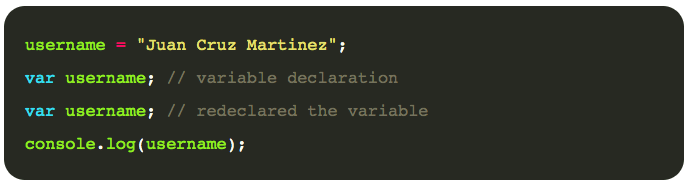
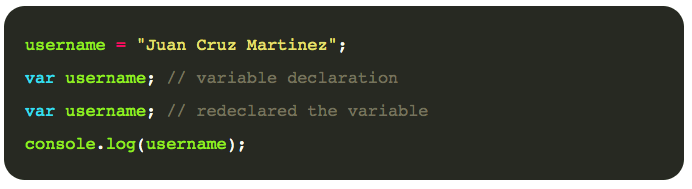
Can you predict the output of the following code?
Code:
Output:
Juan Cruz Martinez Explanation:
- First of all, the variable declaration at line # 2 and line # 3 will be considered as one statement.
- Now, the concept of hoisting will be applied. Meaning JavaScript will move the variable declaration to the top. After that, the code will be executed.
- Also, remember that the value stored in a variable will not be lost even if we redeclare the variable.
What is JavaScript ‘Strict Mode’?
The default behavior of JavaScript is very forgiving in case we make a minor mistake. It means it will not display any error messages. But, sometimes in development, we need to see all kinds of errors and warnings to debug the code.
Here comes the use of “Strict Mode” in JavaScript. Basically, it’s a restricted variant where JavaScript displays all errors and warnings, even if they are silent ones.
We can enable “Strict Mode” by using the "use strict"; directive at the beginning of our script.
What are some alternatives to Svelte?
Svelte is a front-end development framework for the JavaScript programming language. Some of its popular alternatives include:
- React
- Vue.js
- Angular
What are ‘Self Invoking Functions’?
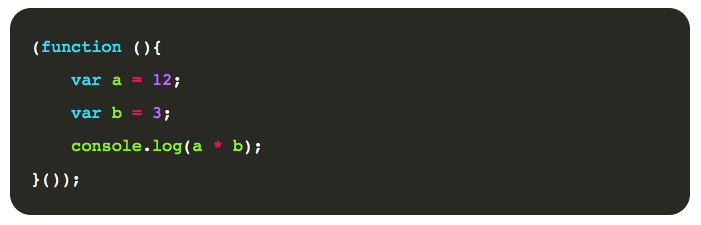
Self Invoking Functions are a little different from normal functions because they are executed immediately where they were declared.
Normally, we first declare a function and later just call it. But, JavaScript automatically executes the code of Self Invoking Functions at run-time.
A point to be noted is that these functions do not have any name. In turn, we are unable to recall these types of functions. They are also known as “Anonymous Functions”.
Here’s an example of Self Invoking Functions:
What is the difference between ‘var,’ ‘let,’ and ‘const’?
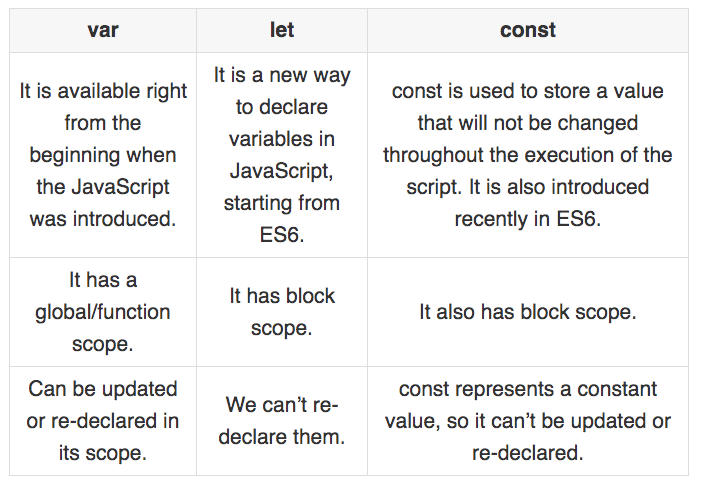
Learn more about them in my article ‘Understanding Variables, Scope, and Hoisting in JavaScript.’
What is the difference between ‘==’ and ‘===’?
Both of them are used in JavaScript to perform a comparison between two values.

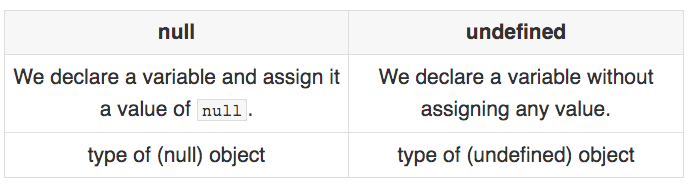
Is there any difference between ‘null’ and ‘undefined’ keywords?
Both of these keywords represent an empty value. But, there are two basic differences between null and undefined.
Can you tell the difference between ‘function declaration’ and ‘function expression’?
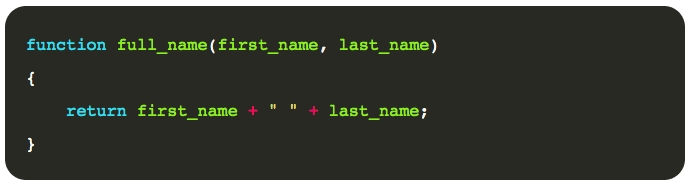
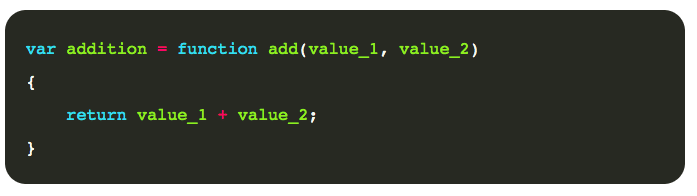
Basically, ‘Function Declaration‘ is nothing but the normal process of defining a function using the keyword function, its unique name, parameters, and the function body. Whereas, when we assign a function declaration to a variable then it becomes ‘Function Expression.’ It’s interesting to note that function expressions are not hoisted, meaning, they’ll display an error if you try to call them before defining.
Function Declaration:
Function Expression:
What is a ‘Closure’?
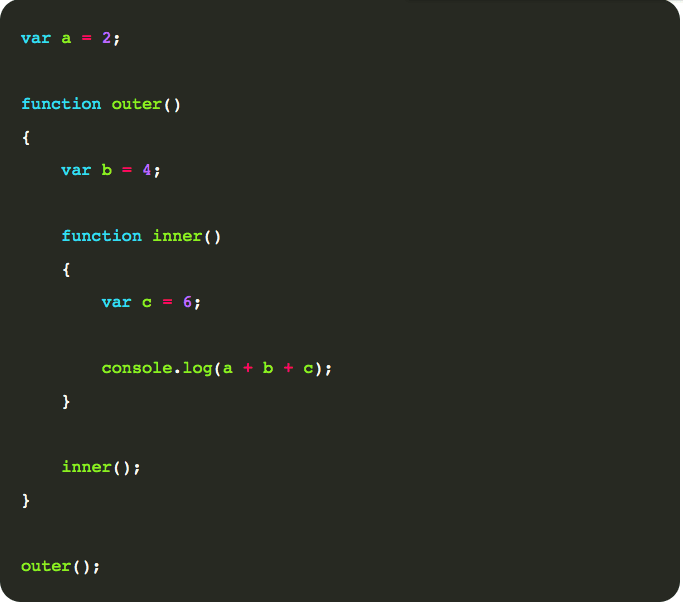
A ‘closure’ in JavaScript is a function inside another function. The inner function has access to its own variables, the variables defined in the outer function as well as the global variables.
Closure Example:
Can you predict the output of these two functions? And will they return same the output or not?
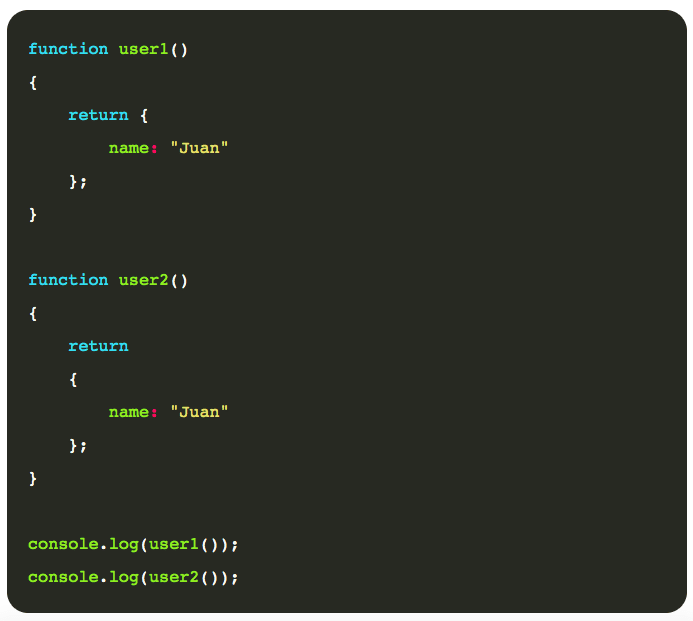
Output of Function user1()
{name: "Juan"} Output of Function user2()
undefined What is ‘NaN’?
In JavaScript, NaN stands for “Not a Number.” It’s a special value that occurs when we’re unable to perform an operation.
For example, what if we try to divide a string using a number (e.g. “Hello World” / 5).
Can you explain the for-in loop?
The for-in loop is specifically designed to loop through all the object’s properties in a step by step manner. It selects one property from the object in each iteration and performs the required operations on it.
Let’s try to understand it with the help of an example:
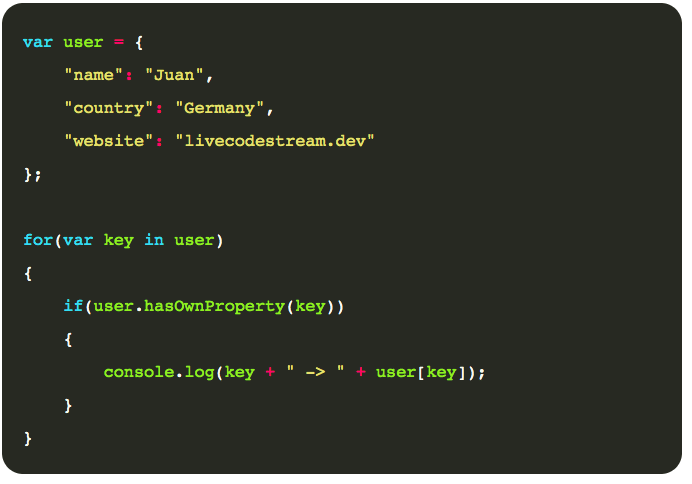
Output:-
name -> Juan country -> Germany website -> livecodestream.dev What’s ‘Event Bubbling’ and ‘Capturing’?
In JavaScript DOM, HTML elements are nested inside one another to form a hierarchy.
Now, if both parent and child elements have registered a handle for a specific event then what will be the order of event propagation?
It can be determined in two ways which are known as event bubbling and capturing.
In event bubbling, the child element will capture the event first and then propagate it to parent elements. Whereas, in event capturing, the parent element will capture the event first and then propagate it to the child elements.
What’s the difference between JavaScript and ECMA Script?
JavaScript is a scripting language whereas ECMA Script is a collection of guidelines and rules to standardize JavaScript across different web browsers.
How do you create a cookie using JavaScript?
In JavaScript, a cookie can be created using a document.cookie object. Simply assign it a string value that is just a series of key-value pairs separated with semi-colons.
JavaScript Create Cookie Example:

Conclusion
Employers usually try to confuse the applicants by asking tricky questions. So, if you’re not well-prepared then chances are you’ll end up losing the opportunity.
So, today, I tried to answer some commonly asked JavaScript interview questions. You may even use it as a reference just before going to an interview.
This article was originally published on Live Code Stream by Juan Cruz Martinez (twitter: @bajcmartinez), founder and publisher of Live Code Stream, entrepreneur, developer, author, speaker, and doer of things.
Live Code Stream is also available as a free weekly newsletter. Sign up for updates on everything related to programming, AI, and computer science in general.
Published October 14, 2020 — 06:30 UTC